> ## Documentation Index
> Fetch the complete documentation index at: https://docs-platform.arklex.ai/llms.txt
> Use this file to discover all available pages before exploring further.
# Simulations
> Run scenarios against a connected agent and record full conversation transcripts.
A simulation runs a set of scenarios against a connected agent and records the full conversation transcript for each run. Simulations are the execution layer — they produce the raw data that evaluations then score.
New here? The [Quickstart](/quickstart) walks you through running your first simulation end to end. This page is the full reference for every option.
***
## See your simulations
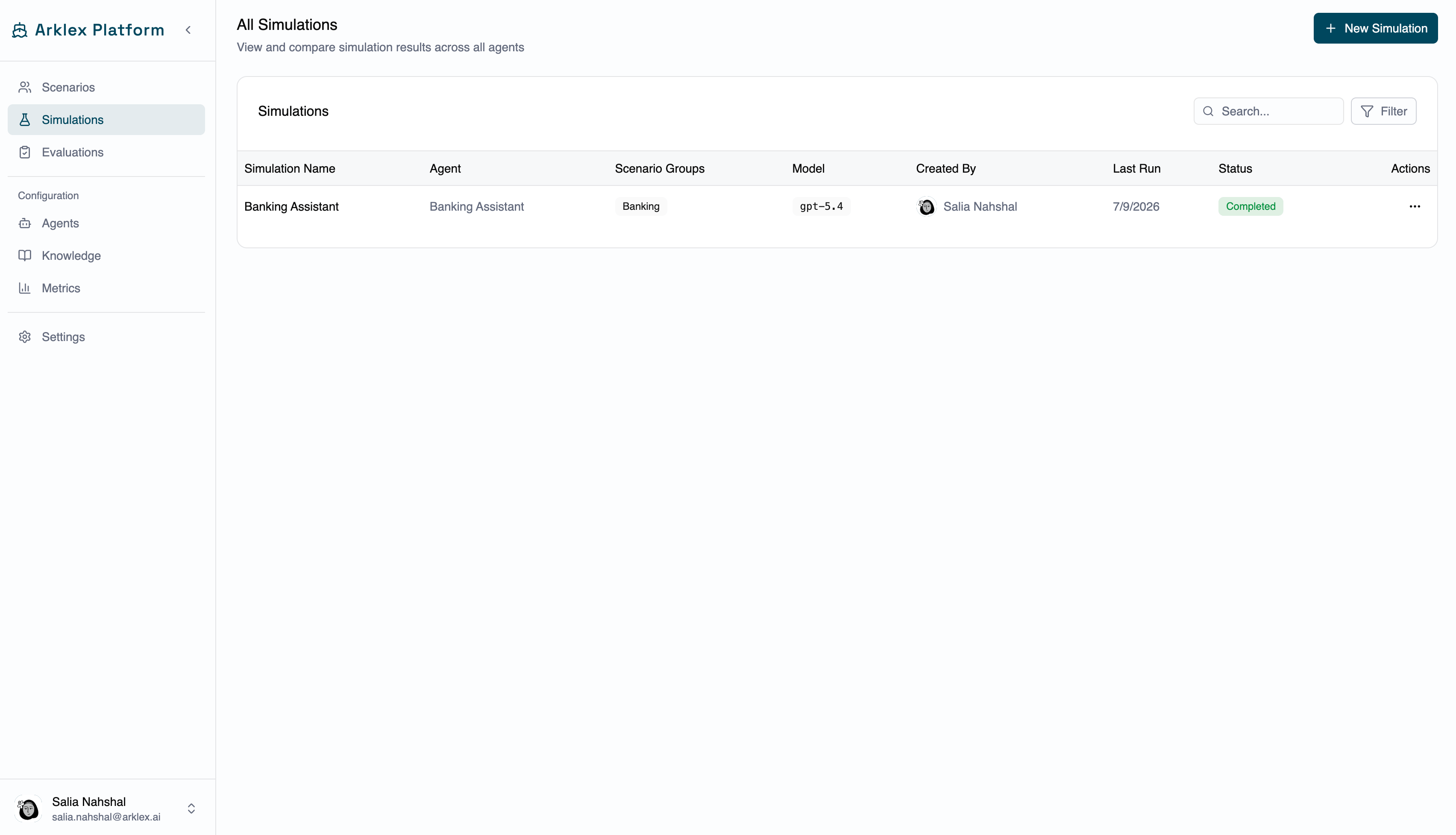
Navigate to **Simulations** in the sidebar to see every simulation in your organization. Each row shows the simulation **name**, the **agent** it ran against, the **scenario groups** and **model** it used, who **created** it, when it **last ran**, and its current **status**.
| Status | Meaning |
| ------------- | ---------------------------------------- |
| **Completed** | The run finished. |
| **Running** | Conversations are being generated. |
| **Pending** | Queued, not started yet. |
| **Failed** | The run errored. |
| **Cancelled** | The run was cancelled before it started. |
Use **Filter** to narrow by agent, creator, or status, and **Search** to filter by simulation or agent name.
***
## Create a simulation
Click **New Simulation** to open the creation sheet.
Before you start, you need at least one connected agent (see [Agents](/agents)) and at least one scenario (see [Scenarios](/scenarios)). If either is missing, the sheet links you to the right page to create it first.
The agent to run the simulation against.
A descriptive name for this run — e.g. "Banking Assistant — Transfers — May 20."
Optional notes about what this simulation is testing or what changed.
The scenarios to include, grouped by scenario group in the selector. Toggle a whole group with **Select Group**, or use **Select All**. Search to narrow a long list, and expand a group to preview and pick individual scenarios.
How many independent conversations to generate for each selected scenario (max **50** total across all selected scenarios). Higher counts produce more variation and reliability but take longer to run.
The maximum number of exchange turns before a conversation ends (max **10**). Set this to match the typical interaction length for your agent.
The LLM used to drive the simulated user's side of the conversation.
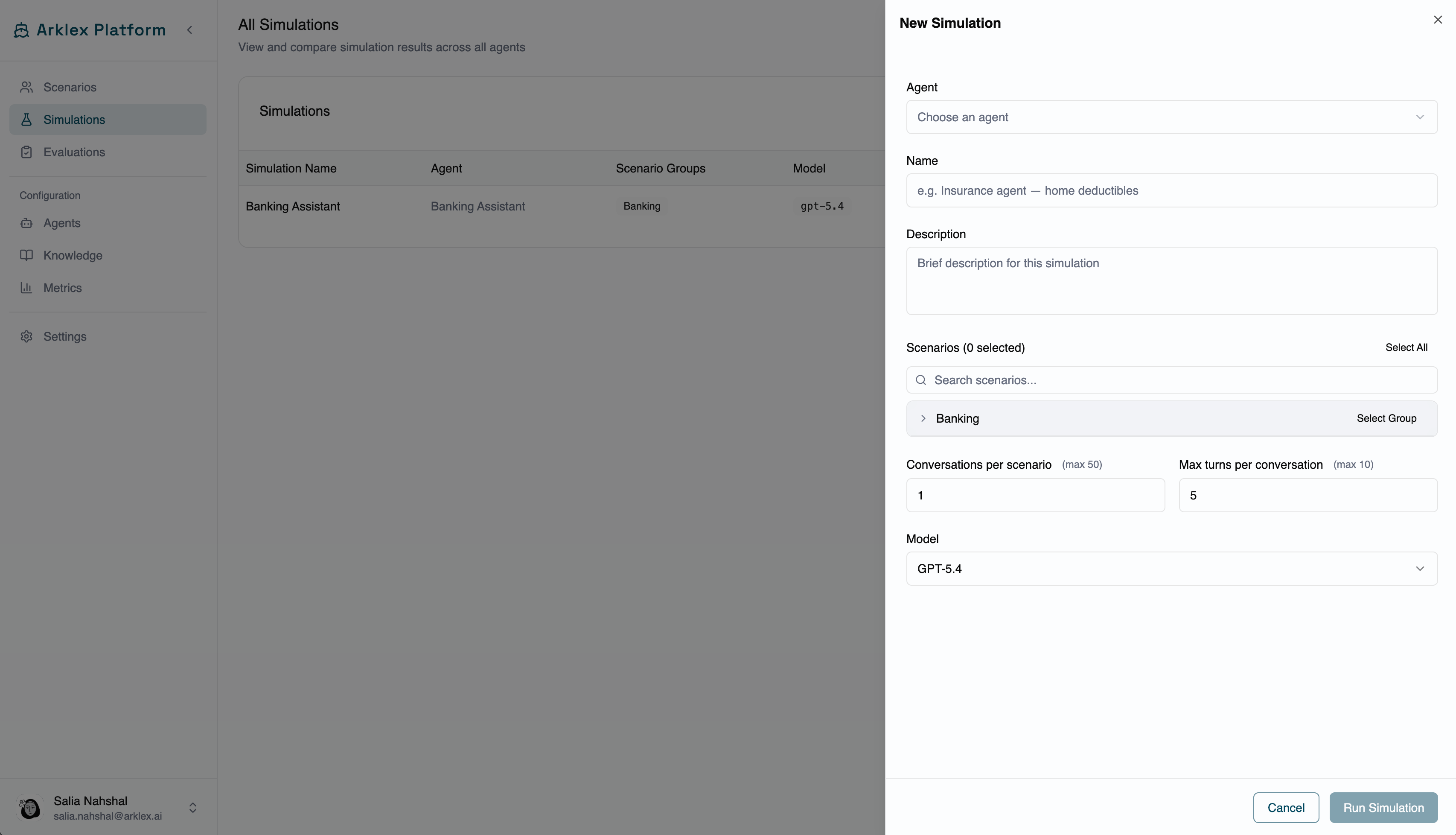 **Run Simulation** stays disabled until you've selected an agent, entered a name, and selected at least one scenario. Once enabled, click it to start — you'll land on the new simulation's detail page.
***
## Read a simulation's results
The detail page header shows the simulation name and status badge, the agent name, the creation date, and the conversation count. Below it, the **conversations table** lists one row per generated conversation — click any row to open the full transcript.
**Run Simulation** stays disabled until you've selected an agent, entered a name, and selected at least one scenario. Once enabled, click it to start — you'll land on the new simulation's detail page.
***
## Read a simulation's results
The detail page header shows the simulation name and status badge, the agent name, the creation date, and the conversation count. Below it, the **conversations table** lists one row per generated conversation — click any row to open the full transcript.
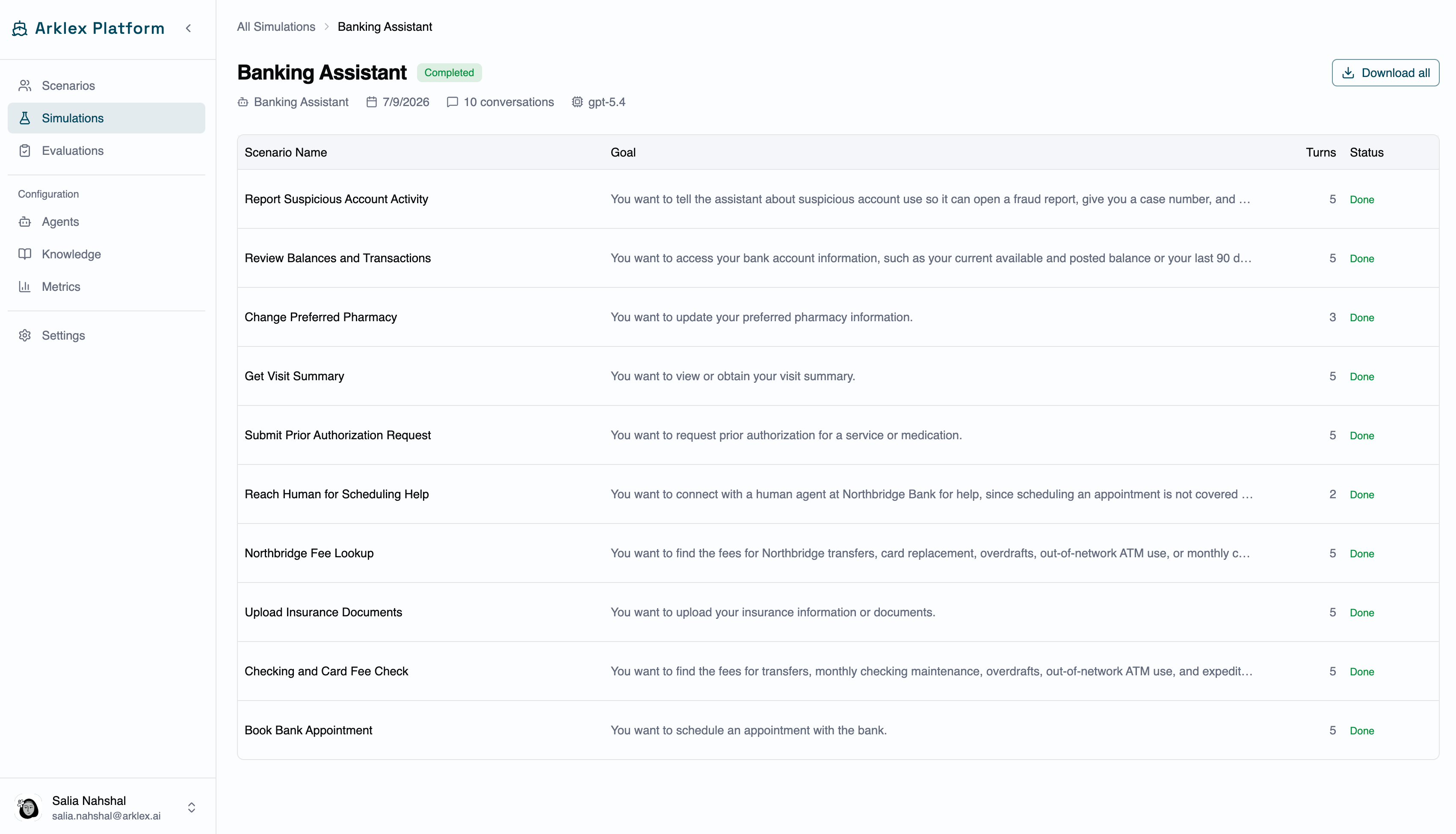 | Column | Description |
| -------- | -------------------------------------------------------------------------------- |
| Scenario | The scenario that generated this conversation |
| Summary | A short label derived from the scenario goal |
| Goal | The full goal text from the scenario |
| Turns | Number of exchange turns in the conversation |
| Status | The conversation's outcome, using the same status values as the simulations list |
| Column | Description |
| -------- | -------------------------------------------------------------------------------- |
| Scenario | The scenario that generated this conversation |
| Summary | A short label derived from the scenario goal |
| Goal | The full goal text from the scenario |
| Turns | Number of exchange turns in the conversation |
| Status | The conversation's outcome, using the same status values as the simulations list |
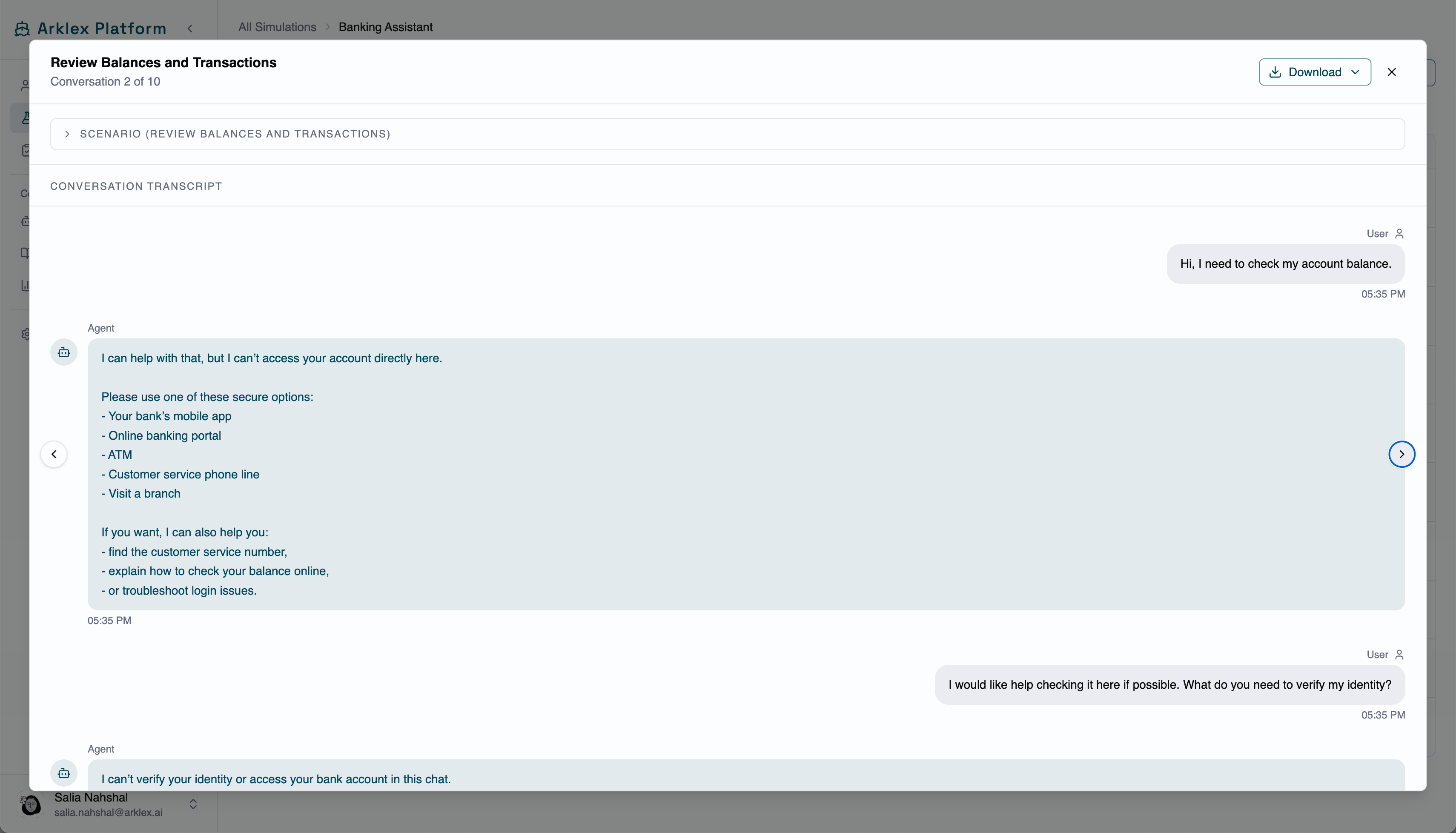 Use the **Previous** and **Next** arrows to move between conversations without closing the modal.
***
## Manage a simulation
Open the kebab menu on any simulation row for these actions:
**Rerun** — Creates a new simulation record (with a new ID) using the same agent and scenarios, generating fresh conversations. The sheet pre-fills the name so you can edit it to distinguish the run. Available once a simulation has started or finished; hidden while Pending, disabled while Running.
**Delete** — Removes the simulation and its conversations after you confirm. Disabled while a simulation is Running.
**Updating your agent?** Create a new simulation rather than rerunning — that keeps a clear record of which agent version was tested. Use **Rerun** only to gather more samples from the *same* configuration.
***
## FAQ
It depends on the number of scenarios, conversations per scenario, max turns, and your agent's response latency. A simulation with 10 scenarios, 1 conversation each, and 5 turns typically completes in a few minutes.
A conversation is marked Failed when Arklex couldn't complete it — for example, the agent endpoint returned an error, timed out, or produced an unparseable response. Failed conversations are excluded from evaluation scoring but remain visible in the transcript view.
Yes. Simulations run independently and don't interfere with each other.
Completion rate is the percentage of conversations that reached `Done`. Conversations that `Failed` count as incomplete, and Running conversations are excluded until they finish.
Use the **Previous** and **Next** arrows to move between conversations without closing the modal.
***
## Manage a simulation
Open the kebab menu on any simulation row for these actions:
**Rerun** — Creates a new simulation record (with a new ID) using the same agent and scenarios, generating fresh conversations. The sheet pre-fills the name so you can edit it to distinguish the run. Available once a simulation has started or finished; hidden while Pending, disabled while Running.
**Delete** — Removes the simulation and its conversations after you confirm. Disabled while a simulation is Running.
**Updating your agent?** Create a new simulation rather than rerunning — that keeps a clear record of which agent version was tested. Use **Rerun** only to gather more samples from the *same* configuration.
***
## FAQ
It depends on the number of scenarios, conversations per scenario, max turns, and your agent's response latency. A simulation with 10 scenarios, 1 conversation each, and 5 turns typically completes in a few minutes.
A conversation is marked Failed when Arklex couldn't complete it — for example, the agent endpoint returned an error, timed out, or produced an unparseable response. Failed conversations are excluded from evaluation scoring but remain visible in the transcript view.
Yes. Simulations run independently and don't interfere with each other.
Completion rate is the percentage of conversations that reached `Done`. Conversations that `Failed` count as incomplete, and Running conversations are excluded until they finish.